Risify offers two plans: Standard and Plus. Both include every core feature, Store Audit, Keyword Tracking, Meta Tags, Breadcrumbs, Similar, Discover, FAQs, Schema, and the AI Agent.
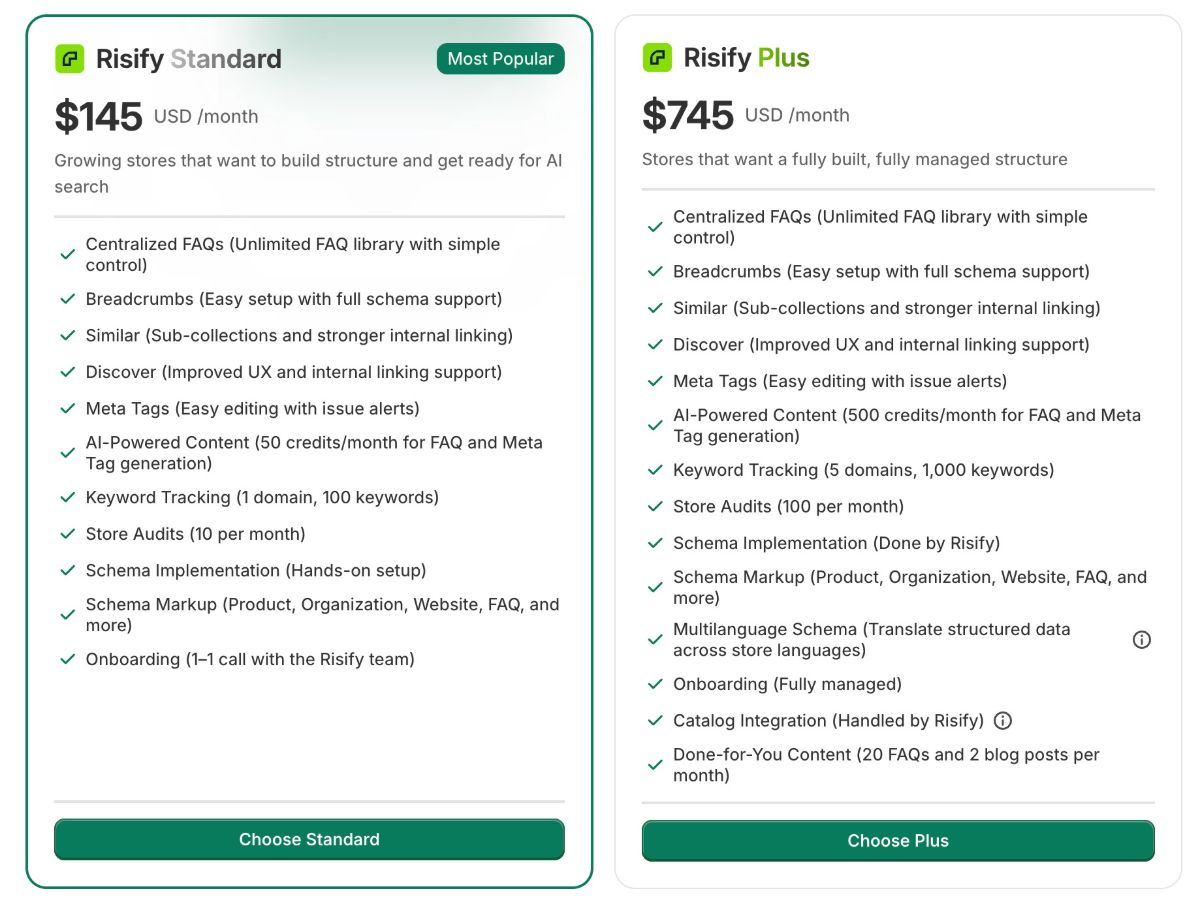
The difference is in the limits, the level of support, and whether you want to set things up yourself or have the Risify team do it for you.
Risify Standard
Risify Standard is $145 per month, or $1,450 per year (17% savings).
This plan is for stores that want full control over their SEO setup and prefer to handle configuration themselves. You get access to every Risify feature with the following limits:
- Track up to 100 keywords on 1 domain.
- Run up to 10 store audits per month.
- 100 AI credits per month for AI-generated content (meta tags, FAQs, breadcrumbs, etc.).
- Hands-on schema implementation guidance.
- 1-to-1 onboarding session with the Risify team.
Standard is a good fit if your team is comfortable working inside Shopify’s admin and Theme Editor, and you want to manage your store’s SEO structure at your own pace.
Risify Plus
Risify Plus is $745 per month, or $7,450 per year (17% savings).
This plan is for stores that want results without allocating internal resources. The Risify team handles the implementation and ongoing execution for you. In addition to all Standard features, Plus includes:
- Track up to 1,000 keywords across 5 domains.
- Run up to 100 store audits per month.
- 2,000 AI credits per month.
- Full schema implementation by the Risify team (not just guidance).
- Done-for-you content: 50 FAQs and 4 blog posts per month, written by AI and reviewed by the Risify team.
- Multilanguage Schema support for international stores.
- Dedicated account manager.
- 1-to-1 onboarding plus ongoing monthly review calls.
- Content marketing plan and SEO strategy guidance.
Plus is the right choice if you have a larger catalog, sell in multiple markets, or simply want the Risify team to handle the heavy lifting while you focus on running your business.
Side-by-Side Comparison
|
|
Standard |
Plus |
|
Price (monthly) |
$145/mo |
$745/mo |
|
Price (annual) |
$1,450/yr |
$7,450/yr |
|
Keywords tracked |
100 on 1 domain |
1,000 on 5 domains |
|
Store audits |
10/month |
100/month |
|
AI credits |
100/month |
2,000/month |
|
Schema setup |
Guided (you do it) |
Done for you |
|
Done-for-you content |
— |
50 FAQs + 4 blog posts/mo |
|
Multilanguage Schema |
— |
Included |
|
Account manager |
— |
Dedicated |
|
Onboarding |
1-to-1 session |
1-to-1 + monthly reviews |
How to Upgrade From Standard to Plus
You can upgrade at any time directly inside the app. There are two ways:
Go to the Risify Settings page and click Billing, where you will see your current plan and a Buy Plan option. Or navigate to the plan selection page where both Standard and Plus cards are shown with a Monthly/Yearly toggle click Choose Plus to start the upgrade.
You will also see upgrade prompts automatically when you hit a Standard plan limit. For example, if you reach 100 tracked keywords, use all 10 monthly audits, or run out of AI credits, the app will show an upgrade option that takes you directly to the plan selection page.
The entire process is self-serve, no need to contact support. Shopify handles the billing confirmation, and your new limits (1,000 keywords, 100 audits, 2,000 AI credits) activate immediately after the upgrade completes.
The Risify team will also reach out to schedule a 1-to-1 onboarding session where they answer your questions and begin planning your implementation. Multilanguage Schema becomes available in the Schema settings section as well.
Summary
Both plans give you access to every Risify feature.
Risify Standard is for teams that want to manage their own SEO setup. Risify Plus is for stores that want the Risify team to handle implementation, content creation, and ongoing optimization.
Start with Standard if you are not sure, you can upgrade anytime.