Risify is built on top of Shopify’s native architecture. It uses the same systems Shopify provides to all app developers, theme app extensions, metafields, metaobjects, and admin UI extensions, rather than injecting custom code into your theme files.
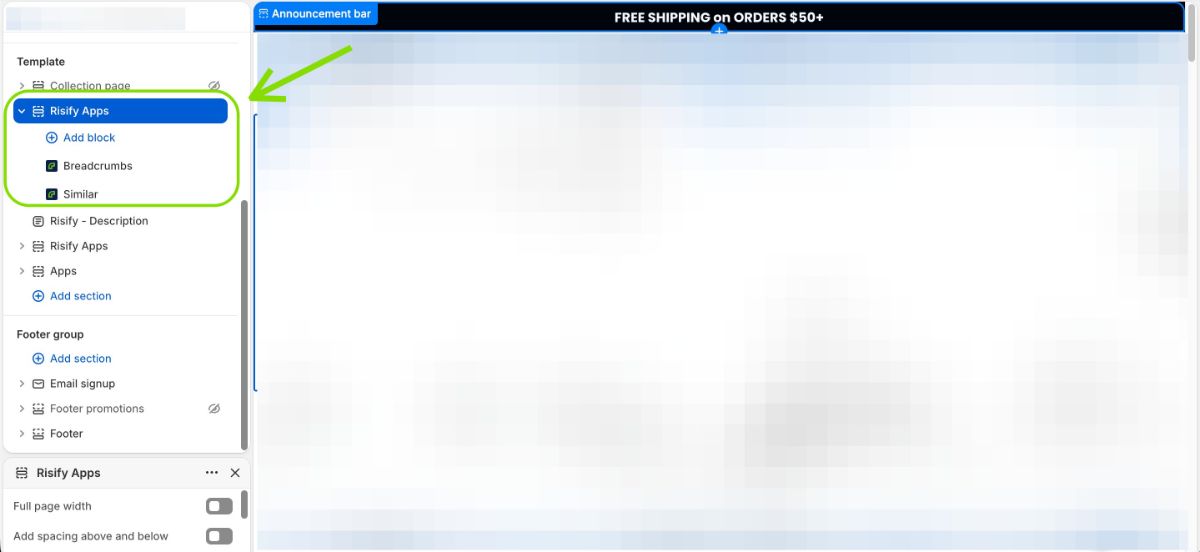
This guide explains where Risify lives inside your Shopify store, what data it creates, what it writes to, and what you should avoid changing to keep everything working correctly.
Where Risify Lives Inside Shopify
Theme App Extension Blocks
Risify’s storefront features are delivered through theme app extension blocks and app embeds. These are the sections you add to your theme through the Theme Editor, just like any other Shopify section. The following features use theme blocks:
- Risify Breadcrumbs, displays breadcrumb navigation on product and collection pages.
- Risify Similar, displays the collection menu bar on collection pages.
- Risify Discover, displays related search suggestions on collection pages.
- Risify FAQ, displays FAQ sections on product, collection, and pages.
- Schema (JSON-LD), an app embed that injects structured data into your page’s HTML. This block is added to your theme’s main layout so it runs across all pages.
None of these modify your theme’s code files. They are layered on top of your theme and can be added, moved, or removed through the drag-and-drop Theme Editor.
Shopify Admin UI Extensions
Risify also extends the Shopify admin interface. On product detail pages, you will see inline editors for FAQs and breadcrumbs. These let you manage Risify content without leaving the product page in your Shopify admin.
Metafields and Metaobjects
Behind the scenes, Risify stores its data using Shopify’s metafield and metaobject systems. Here is how each feature uses them:
- FAQs: FAQ content is stored as app-owned metaobjects. These are assigned to products, collections, and pages through app-owned metafields. This is what allows you to create a FAQ once and reuse it across multiple pages.
- Breadcrumbs, Similar, Discover: The navigation data for each of these features is stored in app-owned metafields on products and collections.
- Schema settings: Your schema configuration is stored in an app-installation metafield and rendered through the Schema (JSON-LD) theme block.
All of this data is “app-owned,” meaning it is scoped to Risify. It does not interfere with your store’s existing metafields or other apps’ data.
Native Shopify SEO Fields
There is one area where Risify writes directly to Shopify’s own data: the Meta Tags feature:
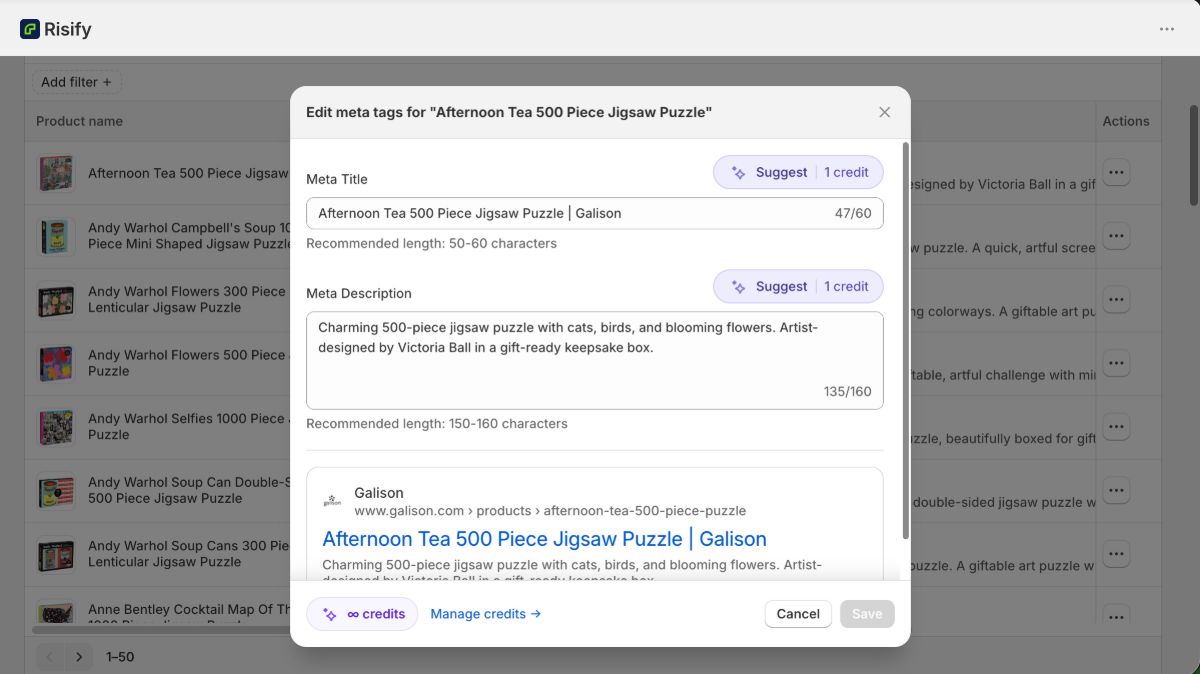
When you edit a product or collection’s meta title or description through Risify, it updates the same native SEO fields that Shopify uses:
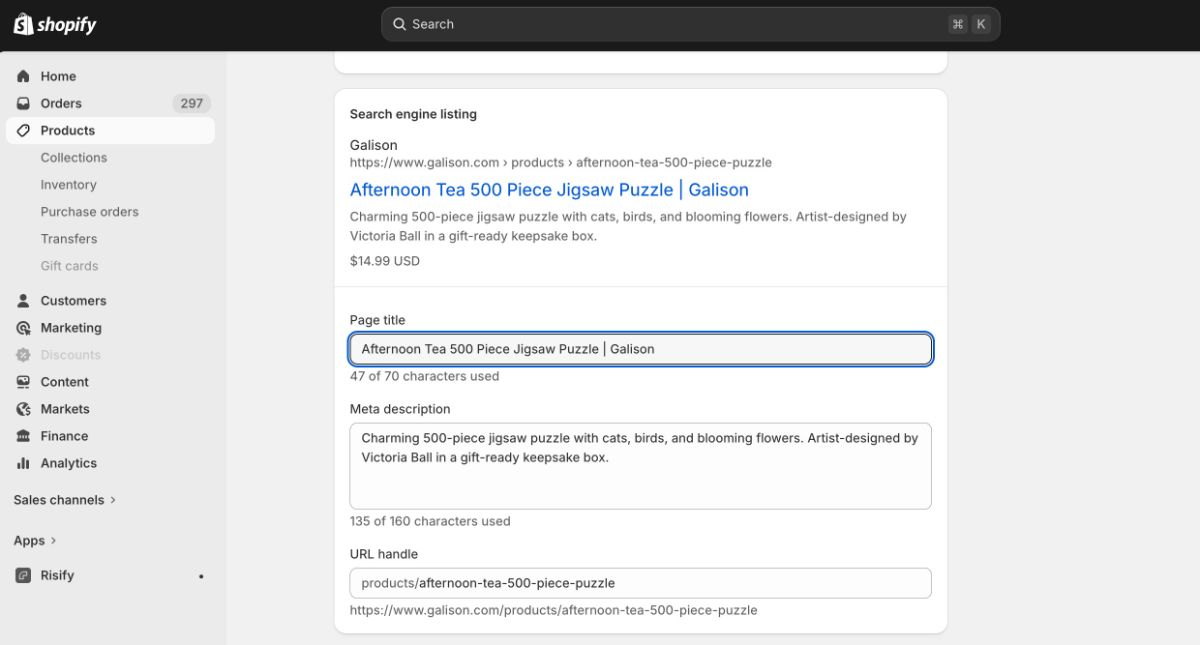
This is the same data you would edit manually in the “Search engine listing preview” section of each product or collection page.
Does Risify Modify Shopify Data Directly?
Risify’s approach is mostly additive. It layers app-owned data and theme extensions on top of your existing store rather than modifying core Shopify data.
Here is the breakdown:
- Additive (app-scoped): Metafields, metaobject definitions, metaobjects, and all theme extension output. This data belongs to Risify and does not change anything in your store’s existing setup.
- Direct write (one exception): The Meta Tags feature writes directly to Shopify’s native SEO title and description fields on products and collections. This is intentional, it’s how those fields are meant to be updated.
- No theme file changes: Risify does not overwrite or edit your theme’s core code files. Everything runs through theme app extensions and app-owned data.
What You Should Not Change After Setup
Because Risify relies on specific Shopify data structures to function, there are a few things you should avoid modifying or deleting after setup. Removing these can break features on your storefront.
Do not delete Risify metafield definitions or metaobject definitions.
These are the data structures Risify creates to store FAQ content, breadcrumb paths, similar collections, and discover suggestions. Deleting them removes the data those features depend on.
Do not delete FAQ metaobjects or their assignments.
If the FAQ feature is in use, deleting app-owned FAQ metaobjects or removing the metafield assignments on products, collections, or pages will break FAQ display on those pages.
Do not remove or disable Risify theme blocks or the Schema app embed.
If you remove a Risify section (Breadcrumbs, Similar, Discover, FAQ) from your theme, that feature stops displaying on the storefront. If you remove or disable the Schema (JSON-LD) app embed, structured data stops being injected into your pages. This is expected behavior, but if you still want these features active, make sure the blocks stay in place.
In short: If you are using a Risify feature, leave its theme block and underlying data in place. If you intentionally want to stop using a feature, removing its theme block is the correct way to do it.
Summary
Risify runs entirely on Shopify’s native infrastructure: theme app extensions for storefront output, metafields and metaobjects for data storage, admin UI extensions for in-context editing, and Shopify’s own SEO fields for meta tag updates.
It does not inject code into your theme files or modify your store’s core data (with the single exception of the Meta Tags feature writing to native SEO fields). To keep everything working, avoid deleting Risify’s metafield definitions, metaobjects, or theme blocks while those features are in use.