AI Visibility in Risify checks how AI tools answer the questions your shoppers ask.
It runs your questions on ChatGPT, Claude and Google AI Mode on a regular schedule and records whether each answer names your store, links to it as a source, and which other brands and sites appear instead.
Search Console and keyword rankings show how your store performs in Google search results. They do not show what AI tools say when someone asks them for a recommendation. AI Visibility covers that part.
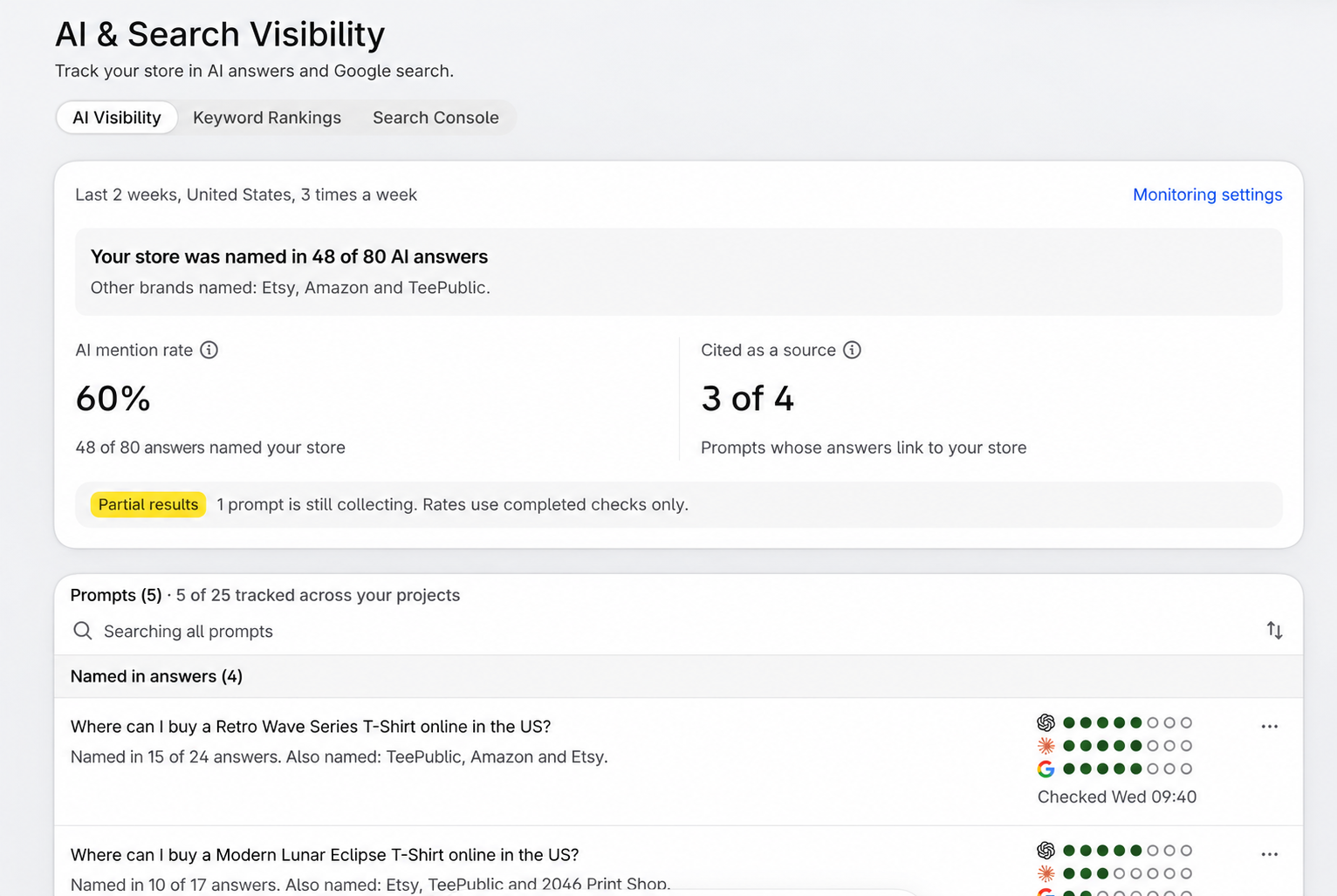
- AI Visibility tracks shopper questions, called prompts, on ChatGPT, Claude and Google AI Mode.
- Each prompt is checked three times a week, and results cover the last two weeks.
- Results show whether your store was named, whether it was cited as a source, and which brands and sites were named instead.
- AI Visibility is the first tab of the AI & Search Visibility page in Risify.
What AI Visibility Measures
AI answers can include a store in different ways. Risify records each of them separately.
Mentions
A mention means the answer names your store. The AI mention rate is the share of answers that named your store across all your prompts. For example, if your store was named in 6 of 78 answers, the mention rate is 8%.
Citations
A citation means the answer links to your store as one of its sources. Cited as a source shows how many of your prompts have answers that link to your store.
Brands Named
Most answers to shopping questions name several stores or brands. Risify records every brand named in each answer, so you can see which ones appear for your prompts and how often.
Sources
AI tools list the websites they used to build an answer. Risify records these sources and shows which domains are cited most often across your prompts.
How AI Visibility Tracking Works
Prompts
A prompt is a question you want Risify to track, written the way a shopper would ask an AI tool.
For example: " Where can I buy a ceramic coffee mug online in the US? "
You add prompts with the Add a prompt button. Each prompt can be edited, paused or deleted at any time.
AI Tools and Schedule
Every prompt is checked on ChatGPT, Claude and Google AI Mode, three times a week, from the United States. These monitoring settings are listed in Project settings.
Collecting Results
AI answers can change from one run to the next, so Risify looks at several checks rather than one. A new prompt needs three checks within two weeks before its rates appear. Until then, it shows as Still collecting , with its progress for each AI tool.
While any prompt is still collecting, the results show a Partial results label. Rates are calculated from completed checks only.
Manual Checks
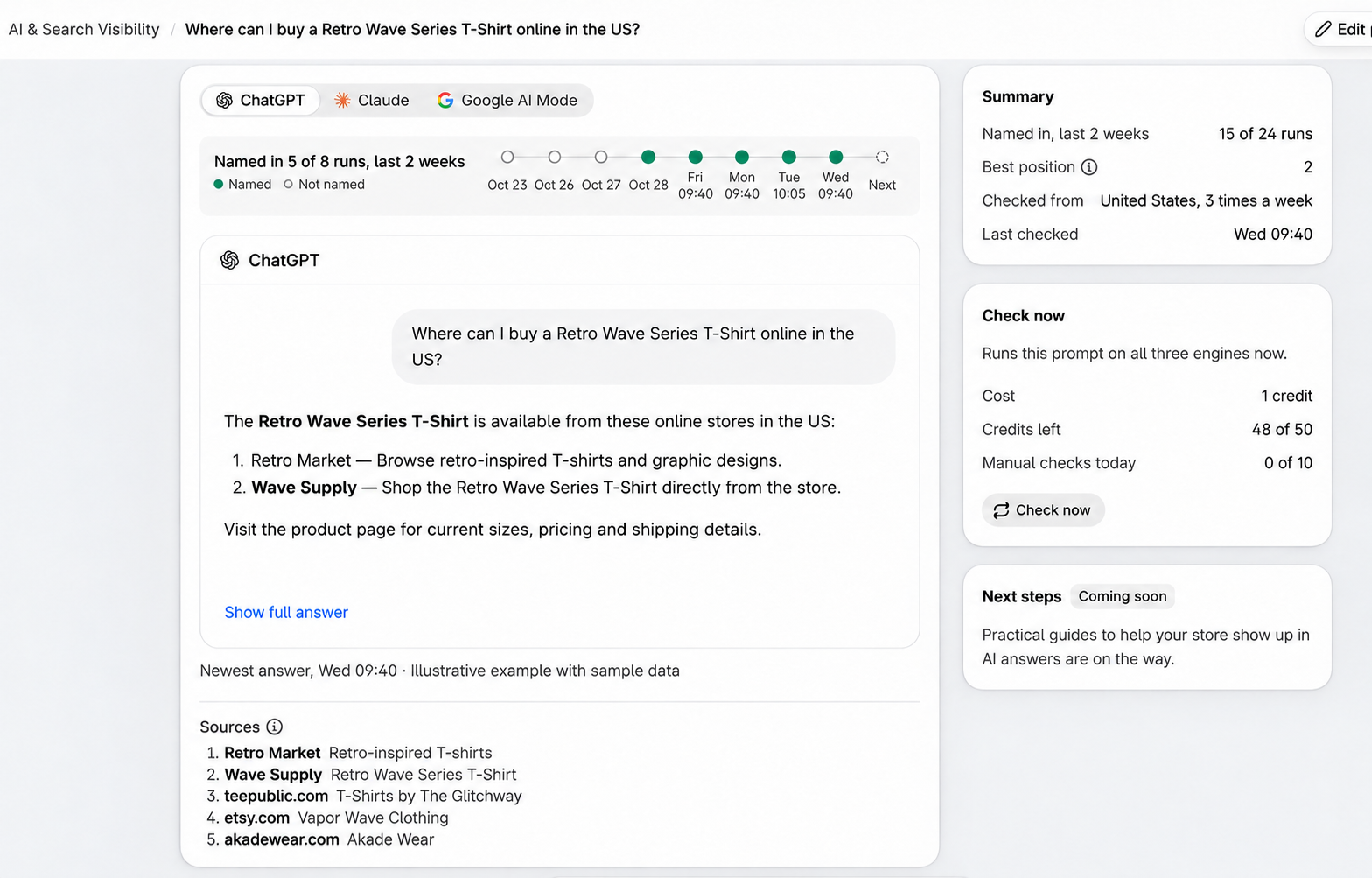
To get a result outside the regular schedule, open a prompt and click Check now . This runs the prompt on all three AI tools at once and uses one AI credit. The prompt page shows your remaining credits and how many manual checks you have used that day.
Projects
Prompts belong to a project, which is linked to a domain. The project selector at the top of the AI & Search Visibility page switches between projects. Plan usage, shown in Project settings, counts prompts across all your projects.
How to Use AI Visibility Feautre in Risify
The AI Visibility Tab
Go to AI & Search Visibility in Risify. The AI Visibility tab shows:
- The monitoring period, location and frequency (for example "Last 2 weeks, United States, 3 times a week").
- A summary of how many answers named your store, and which brands were named most often instead.
- AI mention rate and Cited as a source .
- Your prompts, grouped by result (for example Not named yet and Still collecting ), with search and sorting.
For each prompt, the list shows how many answers did not name your store, the brands named instead, the result of each check for each AI tool, and when it was last checked.
The app's home page, AI & Search Visibility Overview, shows the same mention rate and prompts cited, with a View AI results button.
The Prompt Page
Click a prompt to open its own page. It shows:
- Whether your store is cited as a source, and the date tracking started.
- A tab for each AI tool, with a timeline of every check in the last two weeks marked as named or not named, and when the next check runs.
- The newest answer from that AI tool, with Show full answer to read it in full.
- Sources: the websites the AI tool used for that answer.
- Summary: how many runs named your store, your best position in the answers, where the prompt is checked from, and when it was last checked.
- Brands named: your store and every other brand named in the answers, with how many answers named each one.
- Check now , Edit prompt , Pause and Delete prompt .
Sources & Competitors
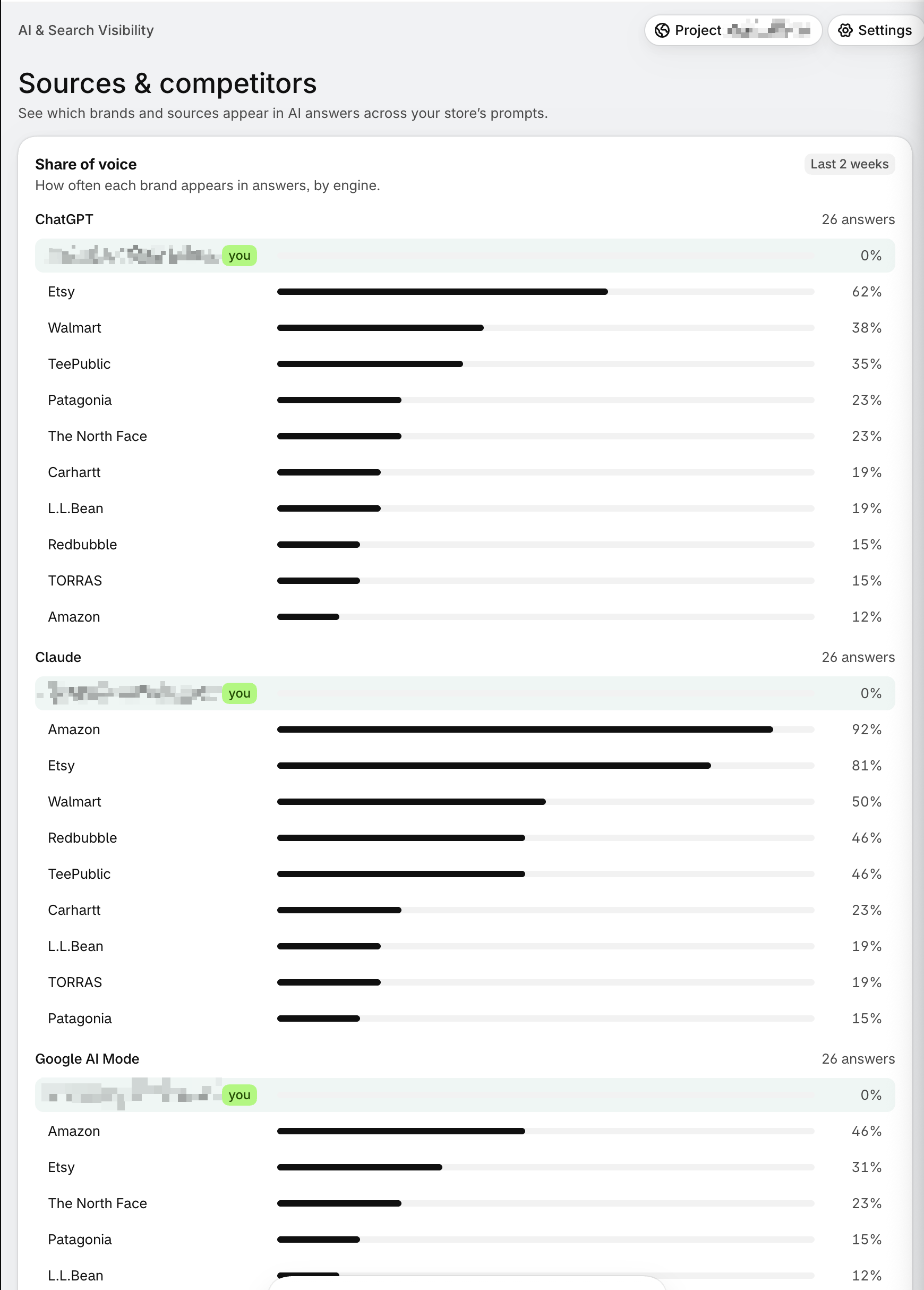
Click Sources & competitors on the AI Visibility tab to see results across all your prompts:
- Share of voice: how often each brand appears in answers, shown separately for ChatGPT, Claude and Google AI Mode. Your store is shown at the top of each list.
- Top cited domains: the sites cited in answers about your store's topics. For each domain, you can see its type (marketplace, competitor, brand or comparison site), which AI tools cite it, how many answers cite it, whether your store appears in those answers, and how many of them cite it without you.
- Brand accuracy: what AI tools say when a prompt names your store, including the tone of the answer. Tone describes how the answer is written; it does not confirm whether each statement is correct. This section fills in once you track a prompt that names your store.
Project Settings
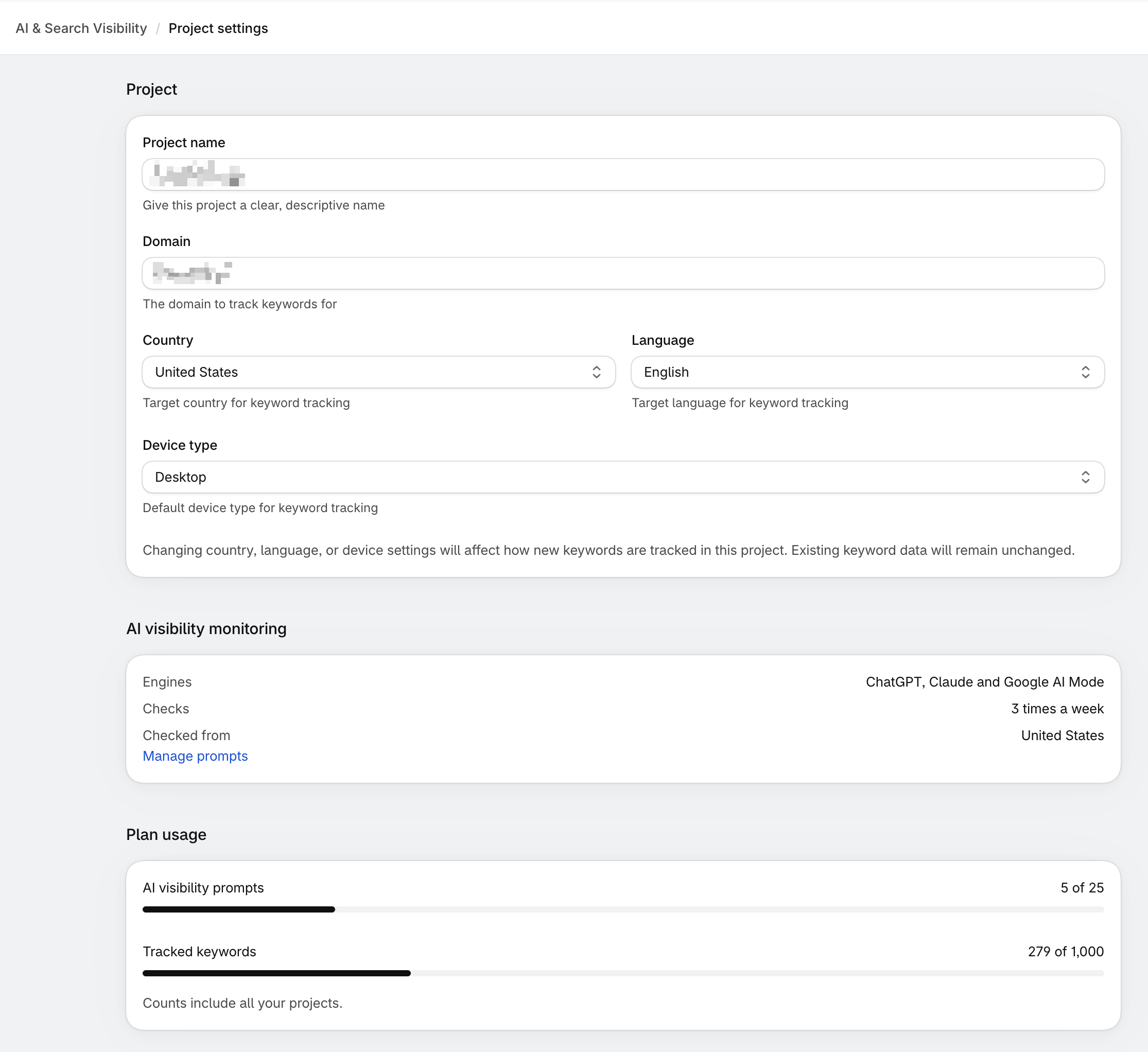
Click Settings on the AI & Search Visibility page to open Project settings. Under AI visibility monitoring , you can see the AI tools, check frequency and location used for your prompts. Under Plan usage , you can see how many prompts you are tracking. Manage prompts takes you back to your prompt list.
Writing Prompts to Track
The results depend on the prompts you track. A few points help keep them useful:
- Write full questions. Shoppers ask AI tools in full sentences, so "Which online stores sell warm hoodies for winter?" reflects real use better than "warm hoodies".
- Mix question types. Include product questions ("Where can I buy...?"), category questions ("What are the best online stores for...?") and use-case or gift questions ("What's a good gift for...?").
- Add a question that names your store. Brand accuracy only shows results for prompts that mention your store, for example "Is [your store] a good place to buy handmade jewelry?"
- Start with your main products and collections. Track the questions closest to what you sell most.
FAQ
Which AI tools does Risify track?
ChatGPT, Claude and Google AI Mode.
How often are prompts checked?
Three times a week. You can also run a prompt at any time with Check now, which uses one AI credit.
Why does a new prompt show "Still collecting"?
A prompt needs three checks within two weeks before its rates appear. Until then, Risify shows its progress for each AI tool.
What is the difference between being named and being cited?
Being named means the answer mentions your store. Being cited means the answer links to your store as a source.
Why does my store appear in some answers but not in others?
AI tools can give different answers to the same question from one run to the next, and each AI tool uses different sources. This is why Risify checks each prompt several times and shows results for each AI tool separately.
Where are AI Visibility settings?
In Project settings, opened with the Settings button on the AI & Search Visibility page.